

What factors make for good “maintainability”, meaning a website can be repaired, updated, and developed further with minimal effort?
We've written elsewhere about our process for fixes and iteration. Just as important is the foundation laid during a new build or relaunch. Here's what we've learned along the way.
Design systems? We’re fans.
It starts with something as small as a button: a robust design system makes it easier to iterate on a website and carry a consistent visual language across different technical systems.
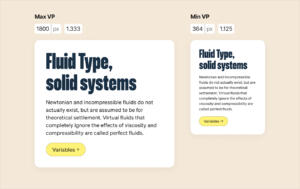
A fluid typography system for brueder coop
To do this, we define so-called design tokens in Figma, which form the basis for components, modules, and templates. This can e.g. be specifications for colors, font sizes, or spacing.
Concepts like a fluid typography system also contribute to maintainability, since they replace the fiddly job of configuring type for countless viewports with a smoothly scaling ratio calculation.
Kudos to Brad Frost, whose Atomic Design principles have guided us for a long time, and to Jina Anne for the “subatomic” token layer.
Principles for website modules
A page builder lets an editorial team build out subpages themselves, easily and flexibly. A good toolkit of website modules saves an enormous amount of work.
Our principles when designing it:
- clear functional separation – for example between teasers, content modules, and forms
- flexible use – wherever possible, no module is configured for just one template
- as few modules as possible – for consistency and ease of handling
Many websites get by with fewer than ten modules in the page builder. Their look can be adapted depending on the template. Our process starts with the brueder frontend component library. From there, we build out the right toolkit for each project's needs.
The joy of APIs
We love a good interface: it lets a website focus on its core job while specific features get handled by other systems. At the start of a project, we run a tech audit to find out which environments (such as Microsoft 365 or Google Workspace) and tools the team already uses.
If you have to scroll through your CMS sidebar, something's gone wrong.
Every third-party integration and plugin comes with extra security risks and maintenance work. We stick to a few rules of thumb when deciding which features will become part of the website core and which will be integrated:
- Stable core: central website functions are built independently of external services, using the CMS's core features – e.g. a multi page setup, navigation and content display.
- Outsource complexity: for features with complex processes – invitation or audience management, social features, support workflows – there are good, established solutions out there. Building these in-house rarely pays off.
- Safety first: we use established plugins and tools that take privacy and security seriously.
Quick gut check: if you have to scroll through your CMS sidebar, something's gone wrong.
Not without my repo
As a rule, every website project of ours lives in its own Git repository, connected to the various hosting environments via auto-deployment.
Changes to the website are first tested in a development environment on our dev server. From there, they move to the test system on the client's server. Once everything checks out, we deploy to production.
Our ticket system also runs through the Git repo, where we document bug reports and feature requests. That way, every change is traceable from the first report all the way to the fix in the code.
One last thing: feedback helps
Right after a site launches, there's usually a lot of feedback coming in from the team or partners. We've had good experiences with internal soft launches. They save testing effort for the core team and let us put feedback to good use early on.
After a while, feedback usually tapers off significantly. Still, it's proven worthwhile to actively offer ways to give feedback – for reporting bugs or accessibility issues, for example.
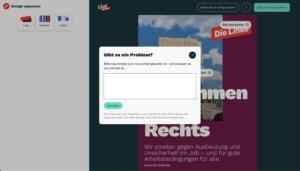
The “?” button in Die Linke's layout generator opens a dialog box, which sends along system and browser specs when submitted.
If I've thought of everything... why do I still need maintenance?
There's a whole list of reasons, we've gathered a few here. Among them: security updates and changing technical requirements, new laws, or user issues. And sometimes it's simply about adding a nice new feature.
Bottom line: to make people happy in the long term, your website has to deliver a stable performance. And maintenance is a crucial part of the process.
Any questions? Get in touch: info@diebrueder.com